
BPMN symbols and shapes: the complete 2.0 reference
BPMN 2.0 shapes fall into six groups: events (circles), activities (rounded rectangles), gateways (diamonds), connecting objects (arrows and lines), swimlanes (pools and lanes) and artifacts (data and notes). The outline of a shape tells you what kind of element it is; the marker inside tells you which variant. Learn the 25 core shapes in the cheat sheet, plus the variants in the tables below, and you can read almost any BPMN diagram.
Free BPMN symbols cheat sheet
The 25 core shapes, each with a one-line meaning, on a single printable page.
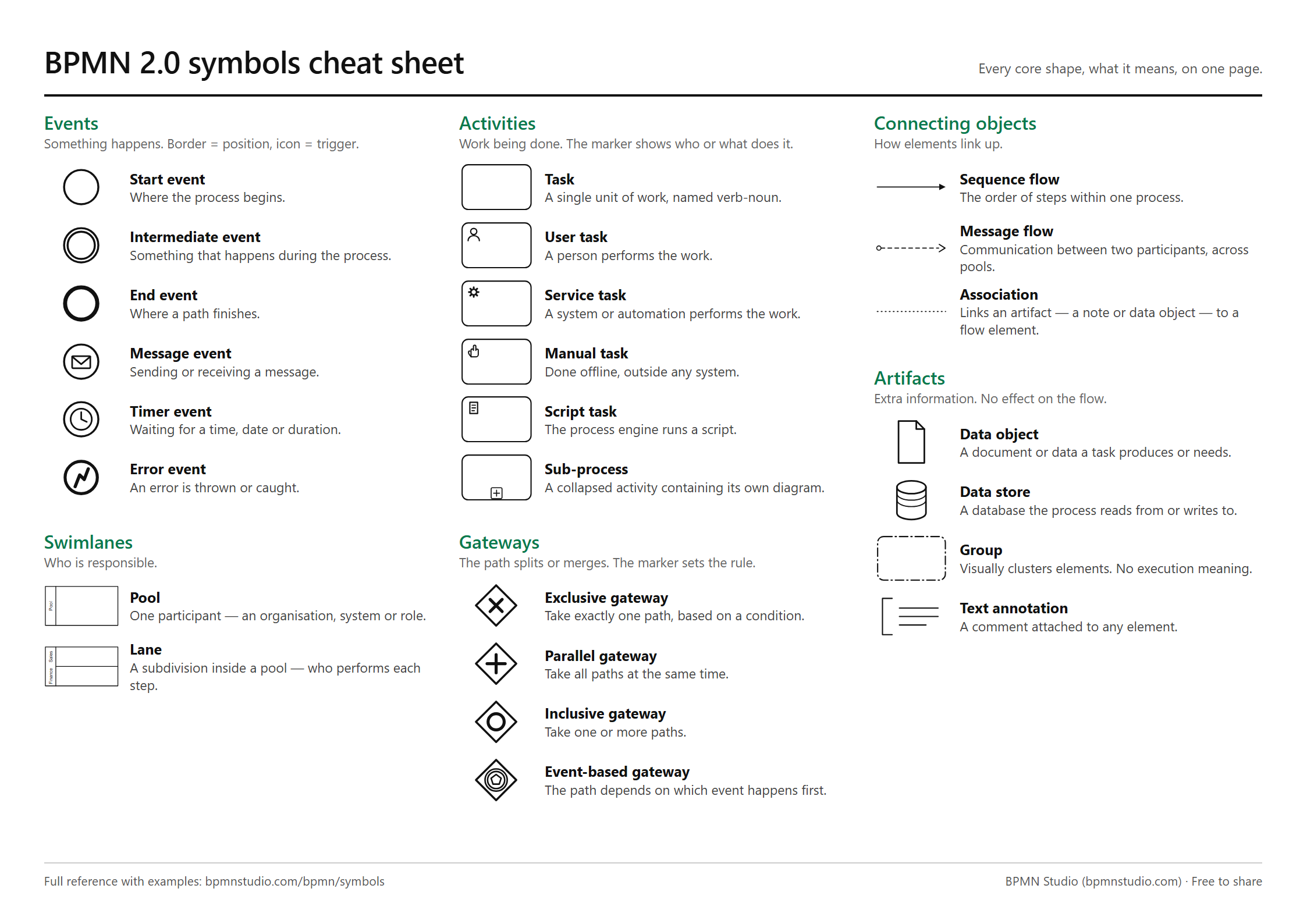
↓ Download the cheat sheet (PDF, A4) ↓ PNG image
Free to print, share and use in training material. If BPMN itself is new to you, start with what BPMN is and come back.
Events (circles)
An event is something that happens: it starts the process, occurs during it, or ends a path. Read the border for the position and the icon for the trigger.
| Event | Looks like | Use it when | Example |
|---|---|---|---|
| Start event | Thin single-line circle | The process begins; one per process is the norm | "Order received" |
| Intermediate event | Double-line circle | Something happens mid-process: a wait, a message, a signal | "Wait 24 hours" |
| End event | Thick circle | A path finishes; use one per distinct outcome | "Order shipped", "Order cancelled" |
| Message event | Envelope inside | A message is sent or received from another participant | "Payment confirmation received" |
| Timer event | Clock inside | The process waits for a date, a time or a duration | "Every Monday 09:00" |
| Error event | Lightning bolt inside | An error is thrown, or caught on a task's boundary | "Card declined" |
| Signal event | Triangle inside | A broadcast any number of processes can react to | "Price list updated" |
| Terminate end event | Filled circle inside a thick circle | Stop the whole process at once, including parallel branches | "Fraud detected" |
Boundary events are intermediate events drawn on the edge of a task. They catch something while the task runs: a timer on "Await payment" that escalates after 24 hours, or an error on "Charge card". A solid border interrupts the task; a dashed border lets it carry on. The order-to-cash example uses one.
More detail, including throwing versus catching: BPMN events explained.
Activities (rounded rectangles)
An activity is work being done. The most common is the task, a single unit of work named verb then noun ("Approve request"). A small marker in the top-left corner says who or what does it.
| Activity | Marker | Use it when | Example |
|---|---|---|---|
| Task | None | You don't need to say who does the work | "Review application" |
| User task | Person | A person does it through a system: a form, an approval | "Approve expense claim" |
| Service task | Gears | A system or API does it with no person involved | "Check credit score" |
| Manual task | Hand | A person does it outside any system | "Pack parcel" |
| Script task | Scroll | The process engine runs a script | "Calculate discount" |
| Send task | Filled envelope | The step's whole job is sending a message | "Email the customer" |
| Receive task | Empty envelope | The step waits for an incoming message | "Wait for signed contract" |
| Business rule task | Table | A decision table or rules engine decides | "Determine risk band" |
| Sub-process | Plus sign at the bottom | A group of steps you want to collapse to one box | "Onboard supplier" |
| Call activity | Thick border | You reuse a process defined elsewhere | "Run KYC check" |
If you're unsure, a plain task is never wrong. The typed markers add precision, and execution engines such as Camunda need them.
Gateways (diamonds)
A gateway is where the path splits or merges. The gateway itself does no work; put the work in a task before it, and the question on the gateway ("Approved?").
| Gateway | Marker | Use it when | Example |
|---|---|---|---|
| Exclusive (XOR) | X, or empty | Exactly one path is taken, chosen by a condition | "Amount over €5,000?" |
| Parallel (AND) | Plus | All paths run at the same time, then re-join | IT setup and payroll setup during onboarding |
| Inclusive (OR) | Circle | One or more paths, each with its own condition | Notify by email and/or SMS |
| Event-based | Pentagon in a double circle | The path depends on which event happens first | Reply received, or 5 days pass |
The rule that catches most people: close a parallel split with a parallel join, and an exclusive split with an exclusive merge. Mixing them deadlocks the process. See BPMN gateways explained and the invoice approval example.
Connecting objects (arrows and lines)
| Connector | Looks like | Use it for |
|---|---|---|
| Sequence flow | Solid line, filled arrowhead | The order of steps inside one pool |
| Message flow | Dashed line, open arrowhead, small circle at the start | A message between two pools |
| Association | Dotted line | Attaching a data object or a note to an element |
Drawing a sequence flow across a pool boundary is one of the most common errors in BPMN. Between pools, use a message flow. More in common BPMN mistakes.
Swimlanes: pools and lanes
- A pool is one participant: an organisation, a customer, or an external system. Draw a second pool only when there is a separate party you exchange messages with.
- A lane divides a pool by role, team or department, showing who performs each step. Every task sits in exactly one lane.
Example: a "Company" pool with Sales, Finance and Warehouse lanes, and a separate "Customer" pool connected by message flows. See BPMN pools and lanes.
Artifacts
Artifacts add information without changing how the process runs.
| Artifact | Looks like | Use it for |
|---|---|---|
| Data object | Page with a folded corner | A document a task needs or produces ("Invoice") |
| Data store | Cylinder | A database read or written ("CRM") |
| Group | Dash-dot rounded box | Visually clustering elements, such as one phase |
| Text annotation | Open bracket with text | A note explaining an element |
The six shapes that cover most diagrams
Start event, task, exclusive gateway, sequence flow, end event, and lane. With those six you can model and read most everyday processes. Add the parallel gateway, a timer or message event, and a second pool when the process needs them.
See the symbols in real diagrams
The 10 BPMN examples use these shapes in context, each with a downloadable .bpmn file. To see which symbols your own process needs, describe it to BPMN Studio and it places them for you; then compare the result with this page. Next: how to create a BPMN diagram.
Frequently asked questions
What are the main groups of BPMN symbols?
Six groups: events (circles), activities (rounded rectangles), gateways (diamonds), connecting objects (sequence flows, message flows and associations), swimlanes (pools and lanes), and artifacts (data objects, data stores, groups and text annotations).
What does a diamond mean in BPMN?
A diamond is a gateway, a point where the path splits or merges. An X or an empty diamond is an exclusive gateway (one path), a plus is a parallel gateway (all paths at once), a circle is an inclusive gateway (one or more paths), and a pentagon inside a double circle is an event-based gateway (whichever event happens first).
What is the difference between a sequence flow and a message flow?
A sequence flow is a solid arrow showing the order of steps within one pool. A message flow is a dashed arrow with an open arrowhead showing communication between two pools. A sequence flow never crosses a pool boundary, and a message flow never connects two elements in the same pool.
What do the different circles mean in BPMN?
Circles are events. A thin single line is a start event, a double line is an intermediate event, and a thick line is an end event. The icon inside is the trigger: an envelope for a message, a clock for a timer, a lightning bolt for an error, a triangle for a signal.
Is there a printable BPMN symbols cheat sheet?
Yes. This page has a free one-page cheat sheet as a PDF (A4 landscape) and a PNG, covering the 25 core BPMN 2.0 shapes with one-line meanings. It is free to print and share.