
Customer support ticket BPMN diagram example
A support ticket process shows off two BPMN strengths: escalation across teams and SLA timers. It's a realistic example of routing and time-based handling.
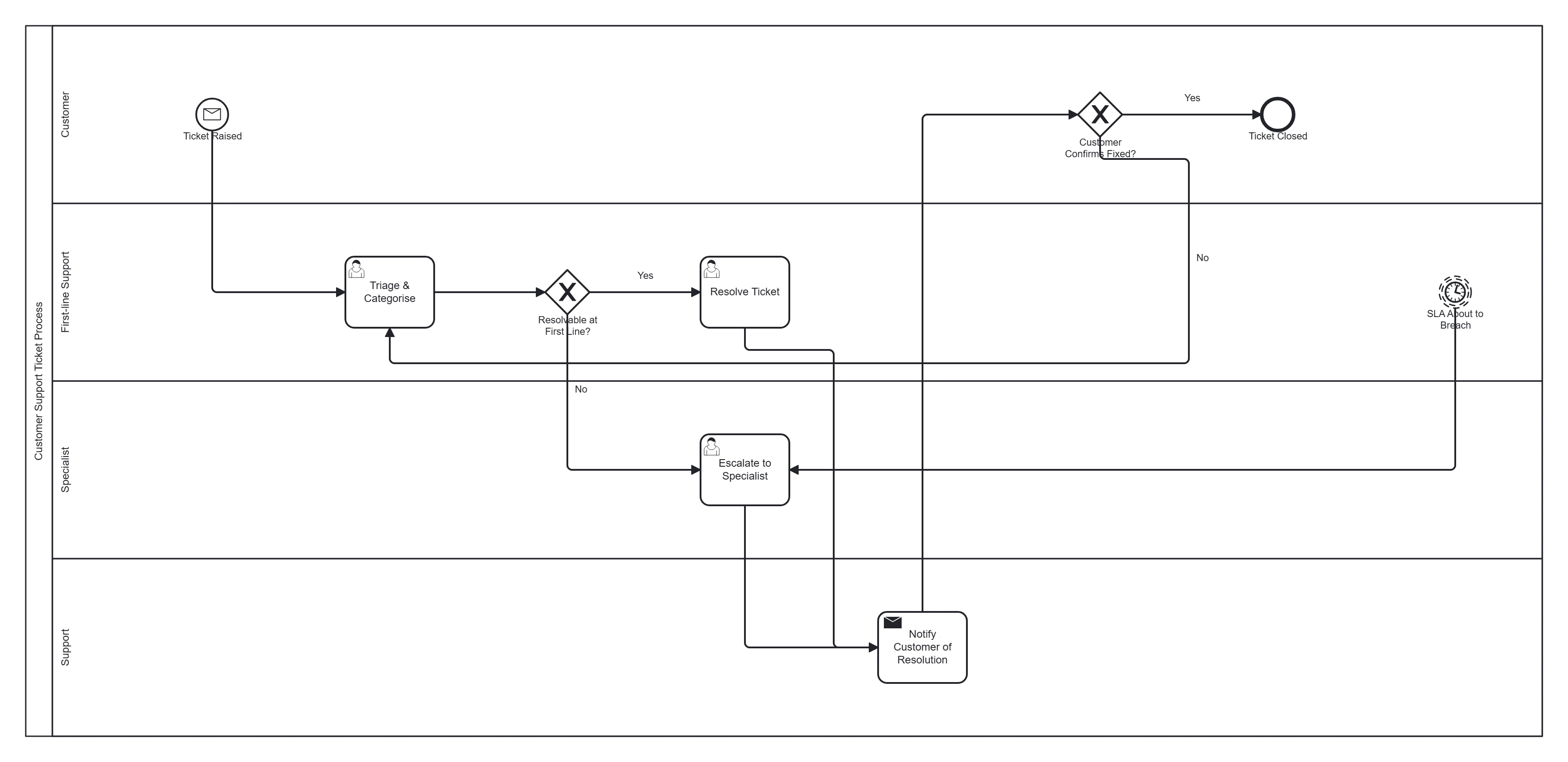
Take this diagram with you. The BPMN 2.0 XML below is the exact source behind the diagram above — open it in Camunda Modeler, Flowable, Activiti, bpmn.io, or any BPMN 2.0 tool.
↓ Download Support ticket handling .bpmnOpen in BPMN Studio
Free, no sign-up, no attribution required.
The process in plain English
A customer raises a ticket. Support triages it and either resolves it at first line or escalates to a specialist. Throughout, an SLA clock runs; if it's about to breach, the ticket is escalated automatically. Once resolved, the customer confirms and the ticket closes.
Steps and their BPMN elements
The middle column names each BPMN element; the BPMN symbols and shapes reference shows what each one looks like.
| Step | BPMN element | Lane |
|---|---|---|
| Ticket raised | Message start event | Customer |
| Triage & categorise | User task | First-line support |
| Resolvable at first line? | Exclusive gateway | First-line support |
| Resolve ticket | User task | First-line support |
| Escalate to specialist | User task | Specialist |
| SLA about to breach | Timer boundary event | — |
| Notify customer of resolution | Send (message) task | Support |
| Customer confirms fixed? | Exclusive gateway | Customer |
| Ticket closed | End event | — |
| Reopen / continue | Loop back | — |
Key modelling points
- The timer boundary event models the SLA — a headline reason to use BPMN over a flowchart.
- Escalation crosses lanes (first-line → specialist).
- The customer-confirms gateway can loop back if the fix isn't accepted.
Generate your own support workflow
Describe your triage rules, tiers and SLAs to BPMN Studio for an instant, editable BPMN 2.0 diagram. More templates · events explained.
Frequently asked questions
How do you model an SLA breach in a support ticket process?
Attach a timer boundary event to the task the SLA applies to. Make it non-interrupting (dashed border) if work should continue while someone is alerted, or interrupting (solid border) if the ticket must be taken away and escalated. Draw the escalation path from the timer, not from the task.