
Employee onboarding BPMN diagram example
Employee onboarding is a great BPMN example because it involves several teams working in parallel. HR, IT and the hiring manager each do their part, often simultaneously, before the new hire is ready on day one.
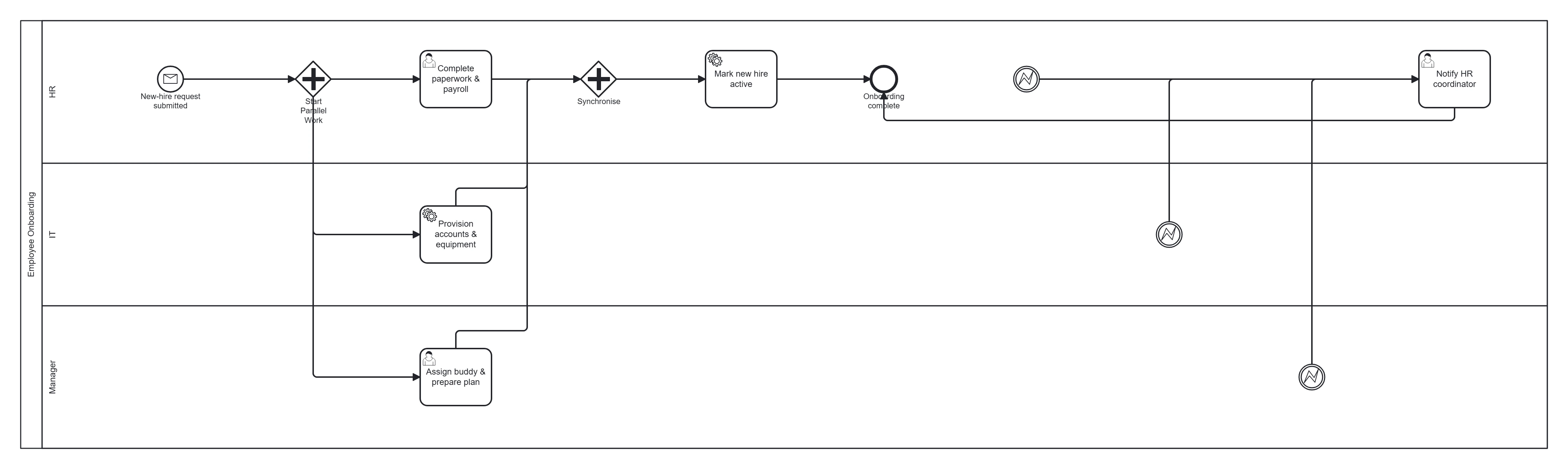
Take this diagram with you. The BPMN 2.0 XML below is the exact source behind the diagram above — open it in Camunda Modeler, Flowable, Activiti, bpmn.io, or any BPMN 2.0 tool.
↓ Download Employee onboarding .bpmnOpen in BPMN Studio
Free, no sign-up, no attribution required.
The process in plain English
HR submits a new-hire request. In parallel, IT provisions accounts and equipment, the manager assigns a buddy and prepares a plan, and HR completes paperwork and payroll setup. Once all three are done, the new hire is marked active. If any task fails or stalls, the HR coordinator is notified.
Steps and their BPMN elements
The middle column names each BPMN element; the BPMN symbols and shapes reference shows what each one looks like.
| Step | BPMN element | Lane |
|---|---|---|
| New-hire request submitted | Message start event | HR |
| Split work | Parallel gateway | — |
| Provision accounts & equipment | Service task | IT |
| Assign buddy & prepare plan | User task | Manager |
| Complete paperwork & payroll | User task | HR |
| Synchronise | Parallel join gateway | — |
| Any step failed? | Error boundary event → notify | HR |
| Mark new hire active | Service task | HR |
| Onboarding complete | End event | — |
Key modelling points
- The parallel gateway is what makes this diagram realistic — the three streams run at once and re-join.
- Error boundary events on each task route problems to the HR coordinator without cluttering the happy path.
- Three lanes (HR, IT, Manager) make responsibilities explicit.
Generate your own onboarding diagram
Describe your onboarding steps and teams to BPMN Studio and get an editable BPMN 2.0 diagram instantly. See more templates or how to create a BPMN diagram.
Frequently asked questions
Why use a parallel gateway for onboarding instead of an exclusive one?
IT provisioning, buddy assignment and HR paperwork all have to happen, and none waits for the others. A parallel gateway starts all three at once, and the matching parallel join waits for every branch before the new hire is marked active. An exclusive gateway would pick only one of them.