
Hiring process BPMN diagram example
A hiring process is a BPMN example of a staged pipeline with a reject path at every gate. Each stage either advances the candidate or ends their application.
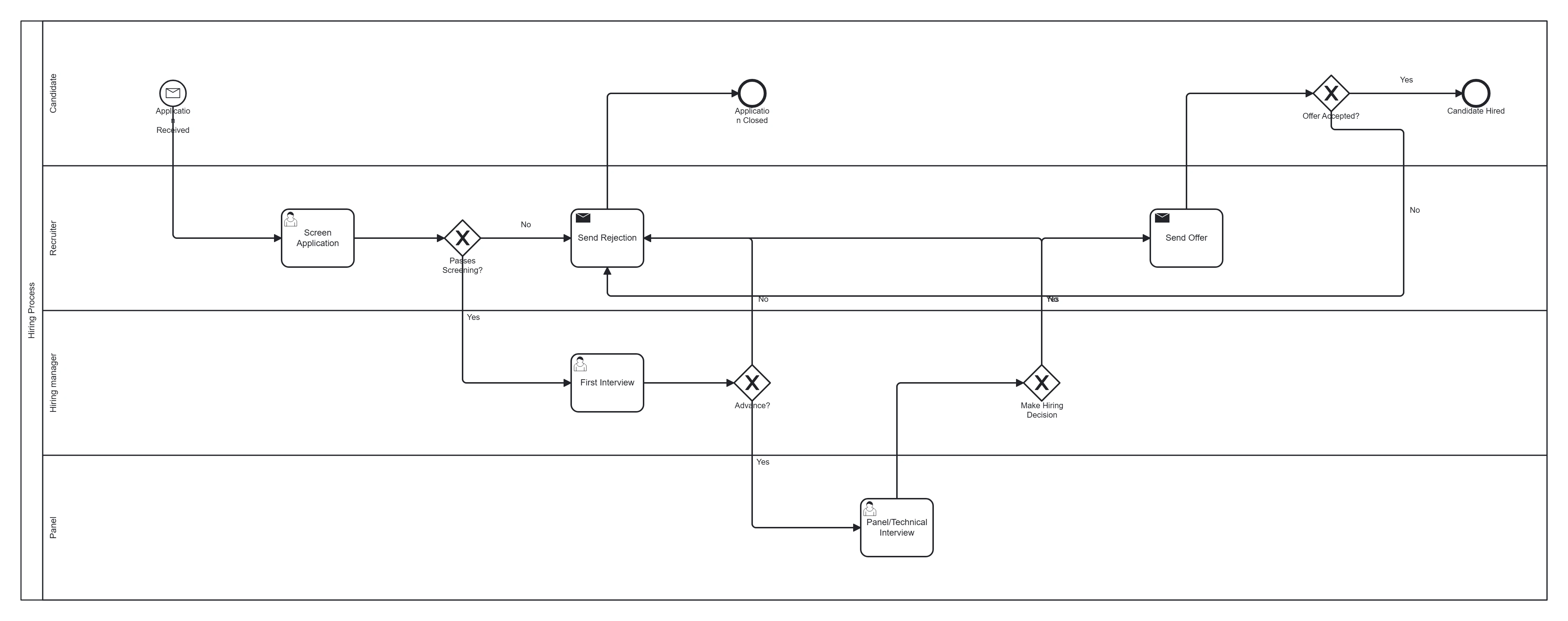
Take this diagram with you. The BPMN 2.0 XML below is the exact source behind the diagram above — open it in Camunda Modeler, Flowable, Activiti, bpmn.io, or any BPMN 2.0 tool.
↓ Download Hiring / recruitment .bpmnOpen in BPMN Studio
Free, no sign-up, no attribution required.
The process in plain English
A candidate applies. Recruiting screens the application; passers get a first interview, then a technical or panel interview. After each stage the candidate either advances or is politely rejected. A successful candidate receives an offer, which they accept or decline.
Steps and their BPMN elements
The middle column names each BPMN element; the BPMN symbols and shapes reference shows what each one looks like.
| Step | BPMN element | Lane |
|---|---|---|
| Application received | Message start event | Candidate |
| Screen application | User task | Recruiter |
| Passes screening? | Exclusive gateway | Recruiter |
| First interview | User task | Hiring manager |
| Advance? | Exclusive gateway | Hiring manager |
| Panel / technical interview | User task | Panel |
| Make hiring decision | Exclusive gateway | Hiring manager |
| Send offer | Send task | Recruiter |
| Offer accepted? | Exclusive gateway | Candidate |
| Send rejection | Send task | Recruiter |
| Candidate hired | End event | — |
| Application closed | End event | — |
Key modelling points
- A reject gateway after each stage is the defining shape of a hiring pipeline — each "no" flows to a rejection task and an end event.
- Keep interviews as separate user tasks to reflect distinct stages.
- Multiple end events distinguish "hired" from "closed."
Generate your own hiring diagram
Describe your interview stages and decision points to BPMN Studio for an instant, editable BPMN 2.0 diagram. More templates · gateways explained.
Frequently asked questions
How do you show a rejection at every hiring stage without a tangle of lines?
Give each stage gateway its own No branch to a send task that notifies the candidate, and end those branches at one Application closed end event. Each outcome gets one end event and no flow has to loop back across the diagram.