
Incident management BPMN diagram example
Incident management is a BPMN example built around severity routing and time-based escalation — exactly the situations flowcharts handle poorly.
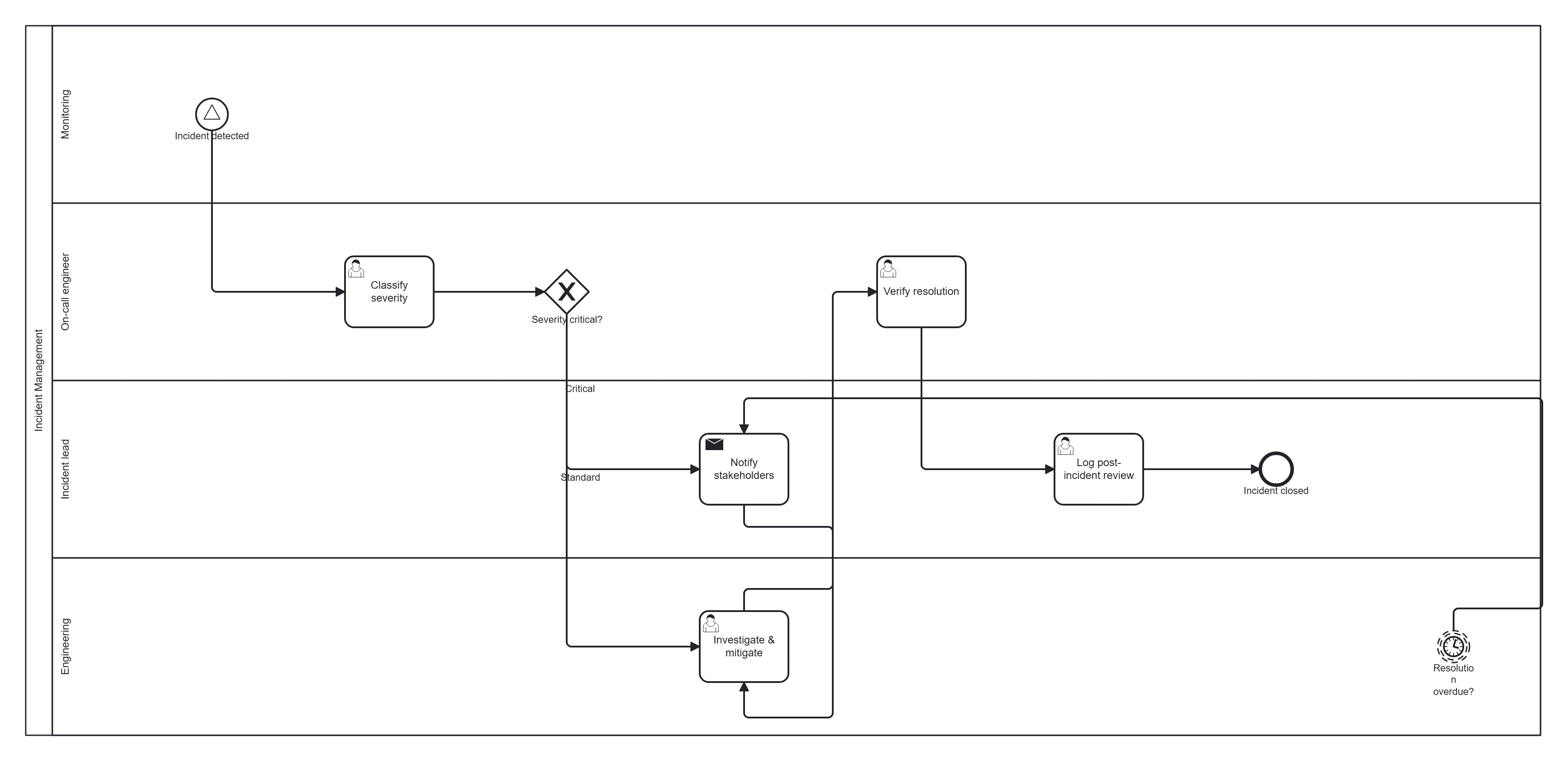
Take this diagram with you. The BPMN 2.0 XML below is the exact source behind the diagram above — open it in Camunda Modeler, Flowable, Activiti, bpmn.io, or any BPMN 2.0 tool.
↓ Download Incident management .bpmnOpen in BPMN Studio
Free, no sign-up, no attribution required.
The process in plain English
An incident is detected (by monitoring or a report). The on-call engineer classifies its severity. Critical incidents trigger immediate escalation and a comms task; lower-severity ones follow standard response. If resolution exceeds the target time, the incident escalates automatically. Once resolved, a post-incident review is logged.
Steps and their BPMN elements
The middle column names each BPMN element; the BPMN symbols and shapes reference shows what each one looks like.
| Step | BPMN element | Lane |
|---|---|---|
| Incident detected | Signal/message start event | Monitoring |
| Classify severity | User task | On-call engineer |
| Severity level? | Exclusive gateway | On-call engineer |
| Notify stakeholders | Send task | Incident lead |
| Investigate & mitigate | User task | Engineering |
| Resolution overdue | Timer boundary event → escalate | — |
| Verify resolution | User task | On-call engineer |
| Log post-incident review | User task | Incident lead |
| Incident closed | End event | — |
Key modelling points
- The severity gateway routes critical vs standard handling.
- A timer boundary event on "Investigate & mitigate" drives auto-escalation — the key time-based control.
- The post-incident review keeps the process honest; model it as an explicit task, not an afterthought.
Generate your own incident process diagram
Describe your severity levels and escalation rules to BPMN Studio for an editable BPMN 2.0 diagram. More templates · events explained.
Frequently asked questions
Should incident detection be a message, signal or timer start event?
Use a message start event when one monitoring tool raises the incident directly to this process, and a signal start event when an alert is broadcast and several processes may react to it. A timer start event fits scheduled checks, not incidents.