
Invoice approval BPMN diagram example
Invoice approval is a classic BPMN example of threshold-based routing — the path an invoice takes depends on its amount and whether approvers sign off.
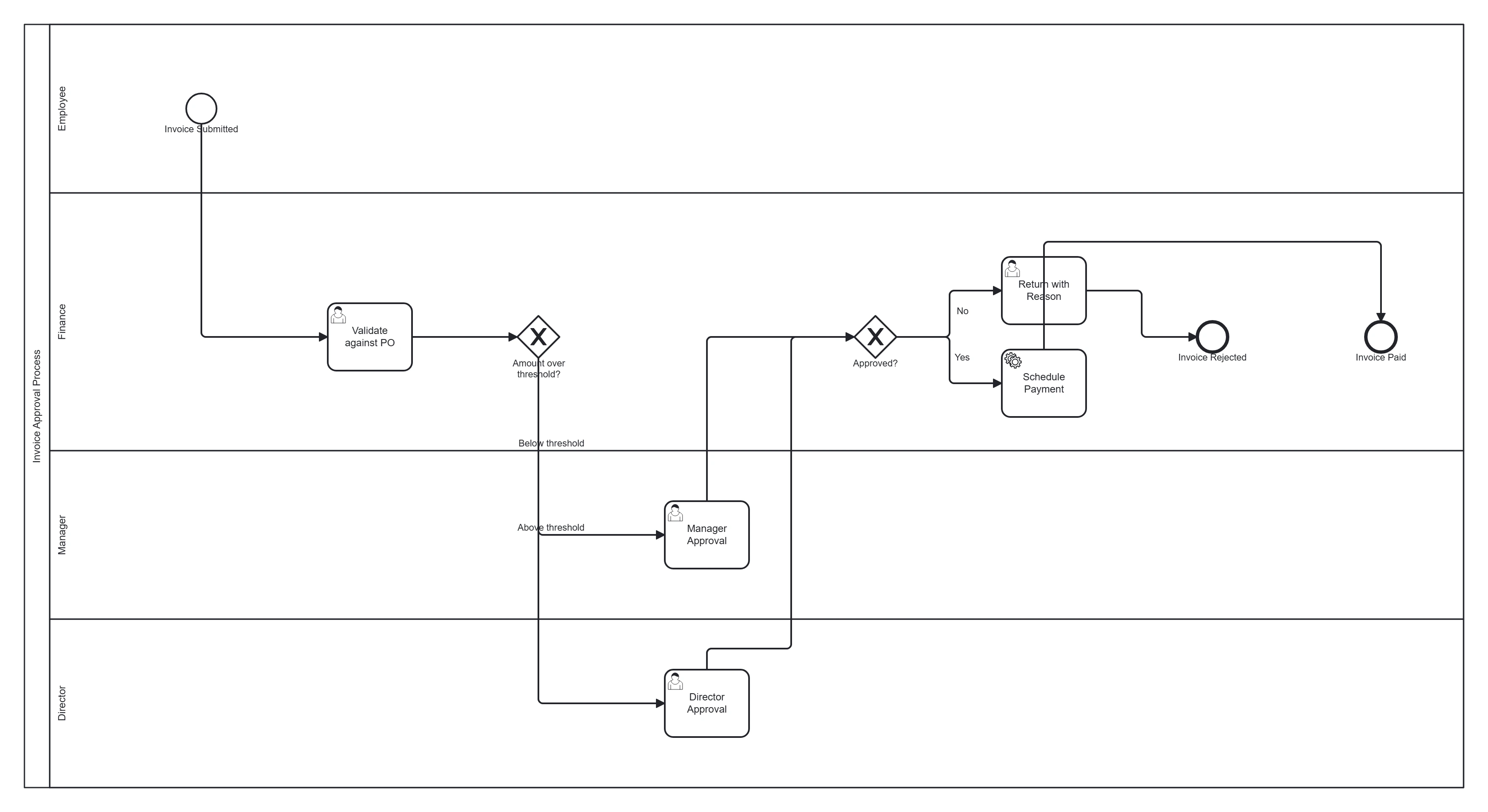
Take this diagram with you. The BPMN 2.0 XML below is the exact source behind the diagram above — open it in Camunda Modeler, Flowable, Activiti, bpmn.io, or any BPMN 2.0 tool.
↓ Download Invoice approval .bpmnOpen in BPMN Studio
Free, no sign-up, no attribution required.
The process in plain English
An employee submits an invoice. Finance validates it against the purchase order. Small invoices need one manager's approval; larger ones need finance-director sign-off too. Approved invoices are scheduled for payment; rejected ones go back to the submitter with a reason.
Steps and their BPMN elements
The middle column names each BPMN element; the BPMN symbols and shapes reference shows what each one looks like.
| Step | BPMN element | Lane |
|---|---|---|
| Invoice submitted | Start event | Employee |
| Validate against PO | User task | Finance |
| Amount over threshold? | Exclusive gateway | Finance |
| Manager approval | User task | Manager |
| Director approval (large only) | User task | Director |
| Approved? | Exclusive gateway | — |
| Schedule payment | Service task | Finance |
| Return with reason | User task | Finance |
| Invoice paid | End event | — |
| Invoice rejected | End event | — |
Key modelling points
- The amount-over-threshold gateway is the heart of the model — label the branches with the actual thresholds.
- A second approved? gateway handles the reject loop back to the submitter.
- Keep validation as a distinct user task; don't fold the decision into the gateway (a common mistake).
Generate your own invoice approval diagram
Tell BPMN Studio your approval thresholds and approvers, and get a valid BPMN 2.0 diagram to edit and export. More templates · gateways explained.
Frequently asked questions
How do you model a multi-level approval threshold in BPMN?
Put an exclusive gateway after validation with a condition on the amount, for example up to a limit to the manager only and above it to the manager and then a director. Name each outgoing flow with its condition, and route a rejection at any level back to the submitter through a return-with-reason task.