
Loan application BPMN diagram example
A loan application process is a great BPMN example of risk-based, multi-outcome decisioning. It combines automated checks with human underwriting and has three distinct outcomes.
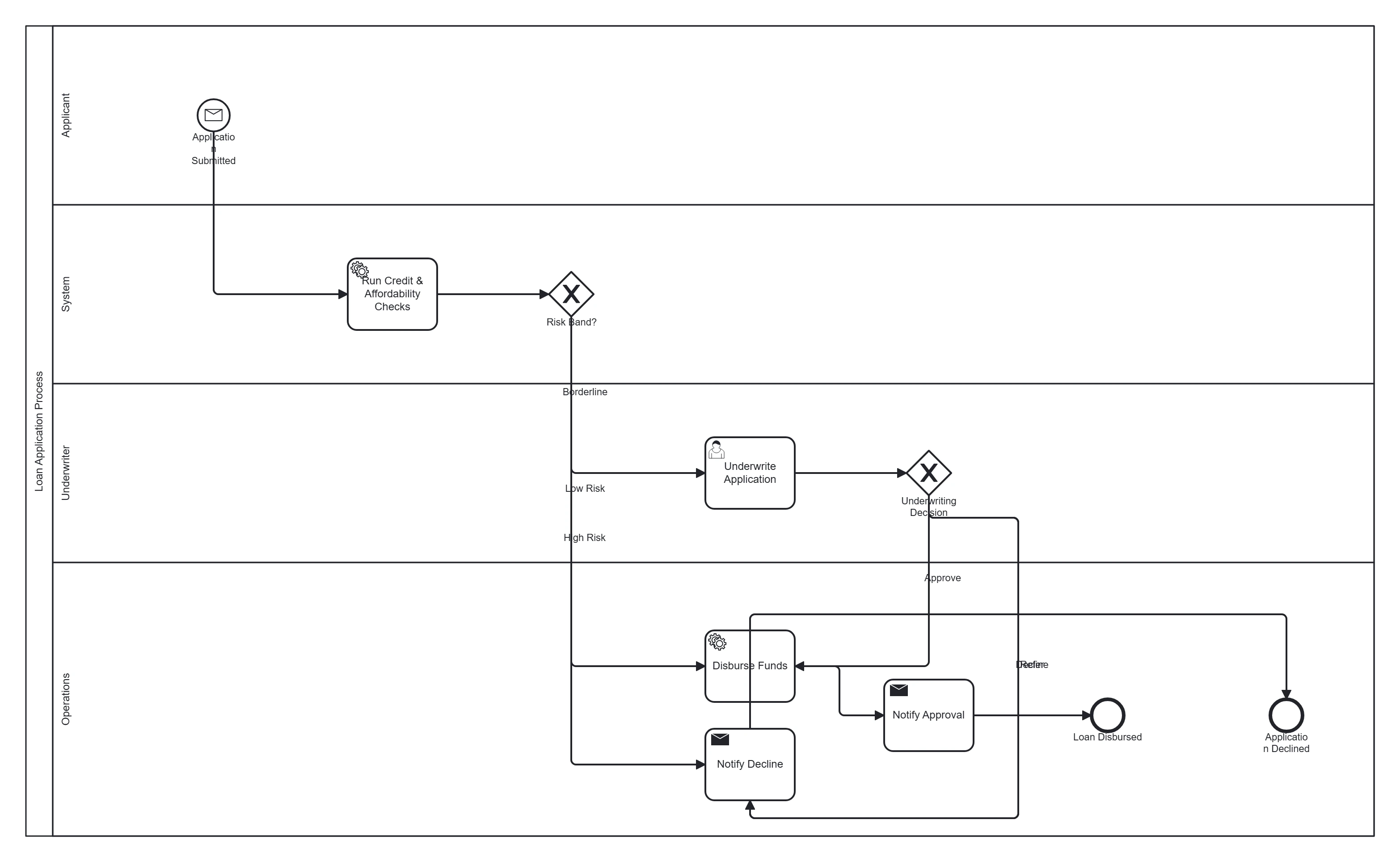
Take this diagram with you. The BPMN 2.0 XML below is the exact source behind the diagram above — open it in Camunda Modeler, Flowable, Activiti, bpmn.io, or any BPMN 2.0 tool.
↓ Download Loan application .bpmnOpen in BPMN Studio
Free, no sign-up, no attribution required.
The process in plain English
An applicant submits a loan request. The system runs automated credit and affordability checks. Low-risk applications are auto-approved; borderline ones go to a human underwriter to approve, refer or decline; high-risk ones are declined automatically. Approved loans are disbursed and the applicant is notified at every outcome.
Steps and their BPMN elements
| Step | BPMN element | Lane |
|---|---|---|
| Application submitted | Message start event | Applicant |
| Run credit & affordability checks | Service task | System |
| Risk band? | Exclusive gateway | System |
| Underwrite application | User task | Underwriter |
| Underwriting decision | Exclusive gateway | Underwriter |
| Disburse funds | Service task | Operations |
| Notify approval | Send task | Operations |
| Notify decline | Send task | Operations |
| Loan disbursed | End event | — |
| Application declined | End event | — |
Key modelling points
- Two gateways: an automated risk band split, then an underwriting decision — keep them separate.
- Automated steps are service tasks; the human review is a user task (using the right task type matters here).
- Multiple end events make the three outcomes explicit — better than one vague ending.
Generate your own loan process diagram
Describe your credit rules and decision tiers to BPMN Studio for an editable BPMN 2.0 diagram you can export for a workflow engine. More templates · common mistakes.
Frequently asked questions
Where should automated checks end and human underwriting begin?
Run the credit and affordability checks as service tasks, then route on the result with an exclusive gateway on the risk band, so only applications that need judgement reach the underwriter's user task. The underwriter's own decision is a second gateway with three outcomes: approve, refer or decline.