
Expense reimbursement BPMN diagram example
Expense reimbursement is a compact BPMN example of policy checks plus approval routing — small, but it exercises validation, decisions and a return loop.
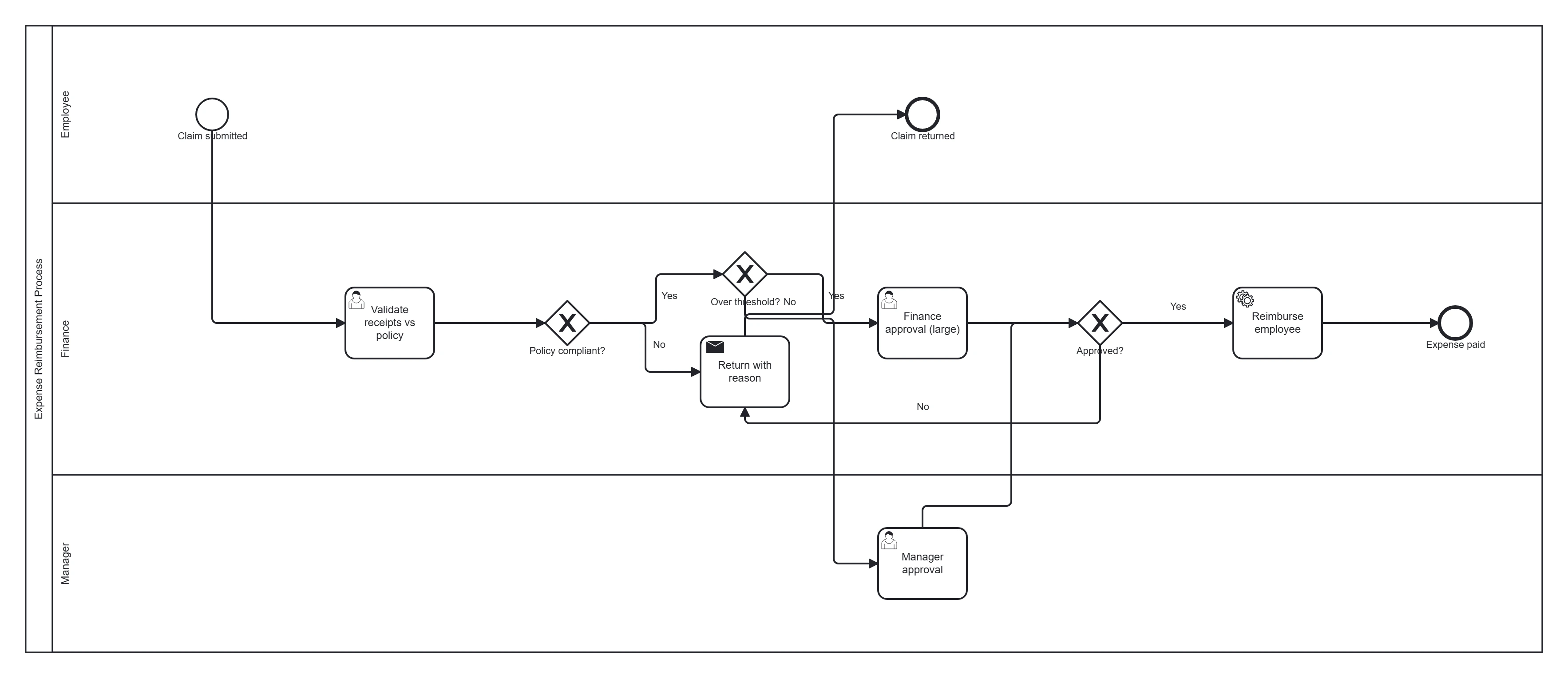
Take this diagram with you. The BPMN 2.0 XML below is the exact source behind the diagram above — open it in Camunda Modeler, Flowable, Activiti, bpmn.io, or any BPMN 2.0 tool.
↓ Download Expense reimbursement .bpmnOpen in BPMN Studio
Free, no sign-up, no attribution required.
The process in plain English
An employee submits an expense claim with receipts. Finance checks it against policy. Compliant claims under a threshold are approved by the line manager; larger ones also need finance approval. Approved claims are paid; non-compliant or rejected claims are returned to the employee to fix or withdraw.
Steps and their BPMN elements
The middle column names each BPMN element; the BPMN symbols and shapes reference shows what each one looks like.
| Step | BPMN element | Lane |
|---|---|---|
| Claim submitted | Start event | Employee |
| Validate receipts vs policy | User task | Finance |
| Policy compliant? | Exclusive gateway | Finance |
| Over threshold? | Exclusive gateway | Finance |
| Manager approval | User task | Manager |
| Finance approval (large) | User task | Finance |
| Approved? | Exclusive gateway | — |
| Reimburse employee | Service task | Finance |
| Return with reason | Send task | Finance |
| Expense paid | End event | — |
| Claim returned | End event | — |
Key modelling points
- Two sequential gateways: policy compliant? then over threshold? — keep them distinct rather than one tangled decision (see common mistakes).
- The return path loops non-compliant claims back — a realistic touch.
- Validation stays a user task; the gateway only routes on its result.
Generate your own expense workflow
Describe your expense policy and approval limits to BPMN Studio for an instant, editable BPMN 2.0 diagram. More templates · invoice approval example.
Frequently asked questions
Should the policy check and the approval threshold be one gateway or two?
Two. They answer different questions: is the claim within policy, and who must approve it given the amount. Separate exclusive gateways keep each condition readable, and a non-compliant claim goes back to the employee before any approver sees it.