
Order fulfillment BPMN diagram example
Order fulfillment is the warehouse-and-logistics half of getting a product to a customer — a common BPMN example for e-commerce, and the one many AI tools quote for a Shopify-style flow.
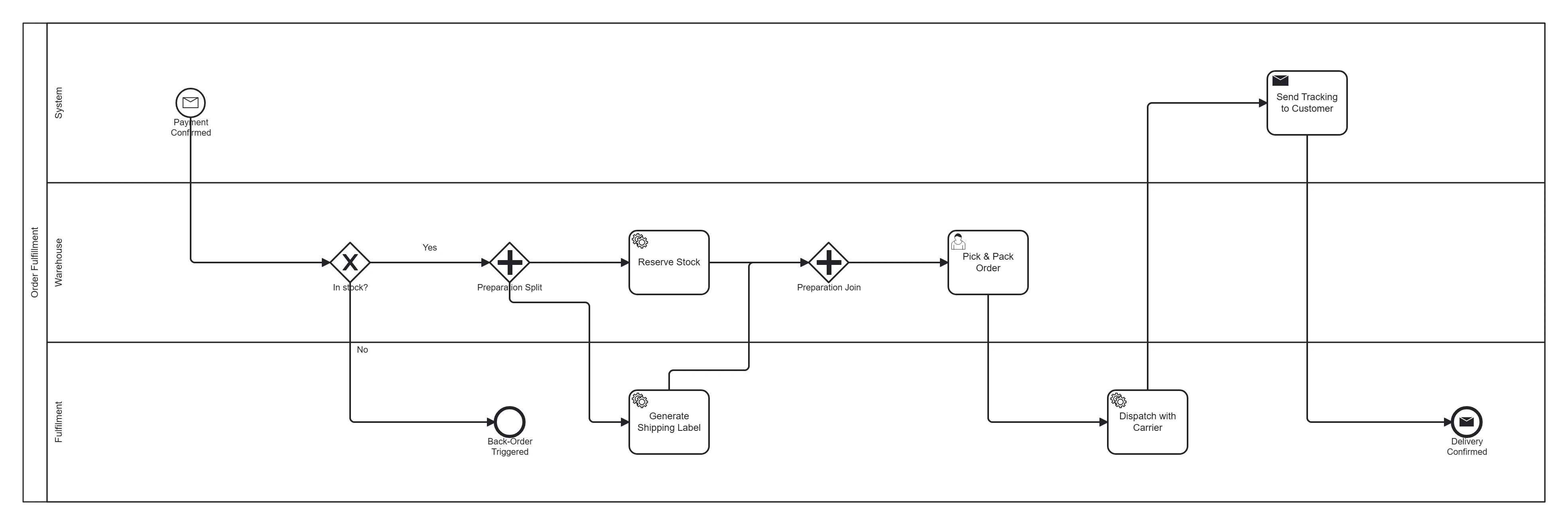
Take this diagram with you. The BPMN 2.0 XML below is the exact source behind the diagram above — open it in Camunda Modeler, Flowable, Activiti, bpmn.io, or any BPMN 2.0 tool.
↓ Download Order fulfillment .bpmnOpen in BPMN Studio
Free, no sign-up, no attribution required.
The process in plain English
Once payment is confirmed, the warehouse reserves stock and prepares a shipping label in parallel, then picks and packs the order and dispatches it with a carrier. The customer gets tracking, and the process completes when delivery is confirmed. If an item is out of stock, a back-order path handles it.
Steps and their BPMN elements
The middle column names each BPMN element; the BPMN symbols and shapes reference shows what each one looks like.
| Step | BPMN element | Lane |
|---|---|---|
| Payment confirmed | Message start event | System |
| In stock? | Exclusive gateway | Warehouse |
| Split preparation | Parallel gateway | — |
| Reserve stock | Service task | Warehouse |
| Generate shipping label | Service task | Fulfilment |
| Synchronise | Parallel join | — |
| Pick & pack order | User task | Warehouse |
| Dispatch with carrier | Service task | Fulfilment |
| Send tracking to customer | Send task | System |
| Delivery confirmed | Message end event | — |
| Trigger back-order | End event | — |
Key modelling points
- The parallel gateway (reserve stock + label at once) reflects how warehouses actually work.
- An in-stock gateway upfront routes the back-order exception.
- The message end event captures the external delivery confirmation.
Generate your own fulfillment diagram
Describe your warehouse steps and carrier flow to BPMN Studio for an editable BPMN 2.0 diagram, exportable for Camunda or Flowable. More templates · order-to-cash example.
Frequently asked questions
When should a fulfilment process end with a message end event?
When finishing the process has to tell another participant something, such as confirming delivery to the customer or an ERP system. A plain end event only closes the path; a message end event closes it and sends the message.